
New in Business Central: Report Themes and Improved Word Layouts
Microsoft has introduced some welcome improvements to document reporting in Dynamics 365 Business Central 2026 release wave 2 (version 29).
The new Report Themes, reusable Header/Footer layouts and enhanced Word layout experience make it easier to create professional, consistently branded documents while reducing the effort required to maintain multiple report layouts.
A new approach to Word report layouts
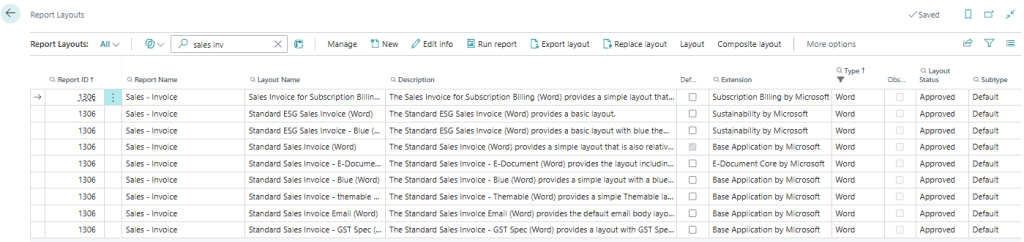
Figure 1: Business Central Report Layouts showing the new Word Layout subtype used for composite layouts.
Traditionally, a customised Word layout might contain everything required for a document, including report data, fonts, colours, company logos, contact information, headers and footers.
While this works well, it can create additional maintenance when the same branding is used across multiple documents, such as Sales Quotes, Sales Invoices, Purchase Orders and Customer Statements.
With the new reporting experience, Business Central can separate a Word report into reusable components:
Body + Theme + Header/Footer = Finished Document
- Body contains the report-specific information, such as customer details, document lines, quantities, amounts and totals.
- Theme controls reusable styling, including fonts, colours and Word styles.
- Header/Footer contains reusable branding, such as your company logo, company details and footer information.
Business Central brings these components together when the report is generated.
Why does this matter?
More consistent branding
A common theme can be used across multiple Word report layouts, helping Sales Quotes, Invoices and other customer-facing documents maintain a consistent look and feel.
Easier maintenance
If your organisation changes its branding, reusable Themes and Header/Footer layouts can reduce the need to make the same changes independently across multiple report layouts.
Better support for multiple companies
Organisations operating several companies in Business Central can use common report layouts while applying company-specific branding.
For example, companies could share the same Sales Invoice body while using their own logos and header or footer information.
Manage themes and headers/footers centrally
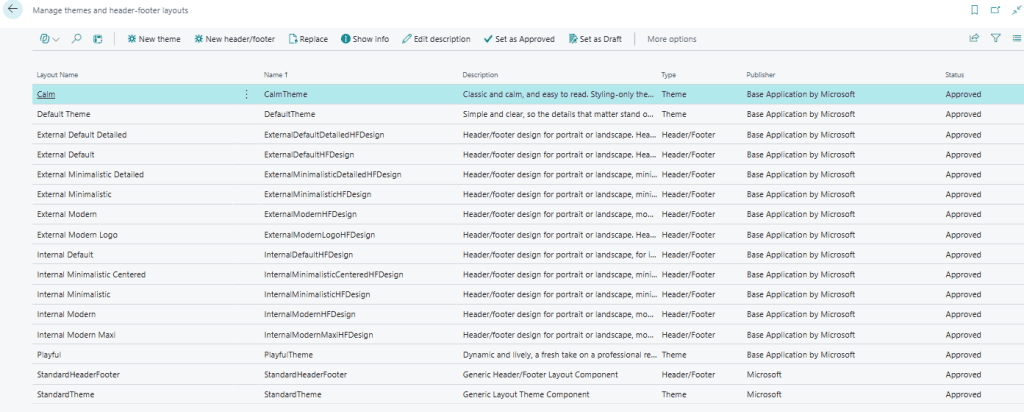
Figure 2: Reusable Report Themes and Header/Footer layouts can be managed centrally in Business Central.
Business Central includes the Manage themes and header-footer layouts page for maintaining these reusable reporting components.
Themes and Header/Footer layouts can move through statuses such as Draft, Pending Approval, Approved and Retired, providing greater control over which components are available for use.
Once approved, these components can be assigned at different levels, allowing organisations to establish common defaults while still accommodating requirements for specific companies, reports or layouts.
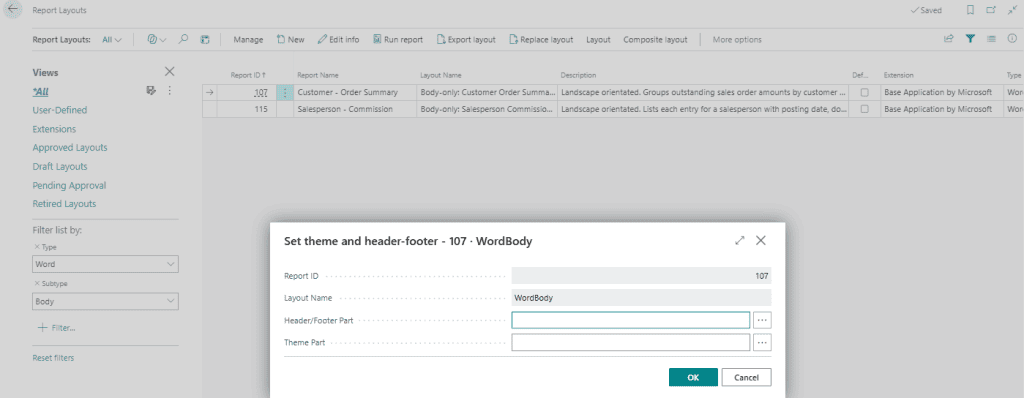
Figure 3: Assigning reusable Theme and Header/Footer components to a Business Central Word report Layout.
An improved Word layout experience
The improvements extend beyond Report Themes.
The Dynamics 365 Business Central Word add-in provides a more accessible way to design Word report layouts, allowing report designers to work with report fields and tables directly within Word.
The new reporting functionality also provides useful options for controlling content that does not need to be displayed. For example, a report can be designed to:
- Hide a field when its value is zero
- Hide an empty table
- Hide empty table rows
- Hide a table column when none of the records contain a value
These options can help produce cleaner, more professional documents and reduce the need to maintain multiple variations of the same report layout.
Why these changes matter
We think these changes are a significant improvement for organisations using customised Word reports in Business Central.
Separating document content from corporate branding provides a more flexible and reusable approach to report design. It can also make future branding changes easier to manage, particularly for organisations with multiple customised documents or multiple Business Central companies.
Want to see how these features could improve the way your team works in Business Central? Talk to the Acumen Consulting (WGTN) Team about getting more from Business Central 2026 release wave2.
